Showing posts with label software. Show all posts

Wednesday, January 14, 2015

FlexControl for Linux+ #hamr

Lately I've been on the air with a FLEX-6700 from FlexRadio Systems.  It's a great rig, but that's a story for another day.

Today's subject is the beautiful FlexControl, which is a "USB Knob" ($99.99).  It is designed as an adjunct input device for the Flex software defined radios, for users who need something more traditional than mouse-based pointing and clicking for tuning and managing a radio.

The product is provided for SmartSDR for Windows, the principal interface program for the Flex 6000 series.  It has a great feel, and it has 3 nice buttons and status lights. SmartSDR provides a Windows driver to work with the FlexControl.

So that's fine, but I'm mainly a Linux guy.  For unfortunate but understandable reasons, Flex only provides Windows control software.  What does the FlexControl look like when plugged into a Linux system?  I could not find any documentation.

With help from Wireshark and VirtualBox, we can do some reverse engineering.

The FlexControl is recognized by Linux (Ubuntu 14.04, but probably most other versions, too).  It appears as /dev/ttyACM0 on my machine. "ACM" signifies that this is a CDC_ACM device.  That category is loosely based on ancient Hayes modem interfaces, but don't worry about that!  Really, it just emulates an old-fashioned serial I/O connection at 115 Kbps.

You can set up minicom or any other Linux program to talk to this device.  The only remaining question is the protocol.  It turns out to be simple.  No surprise, this is a simple device.  The scoop:

Sending from FlexControl to host:
All commands terminate with ';' (no returns or line feeds)
U; - knob CW (single tick) -- U02; U03; U04; etc - multiticks
D; - knob CCW (single tick) -- D02; D03; D04; etc - multiticks
S; - short press, main knob
L; - long press, main knob
C; - fast double click, main knob


The fast knob codes reflect multiple encoder ticks between USB polling times, so the knob should be able to keep track of fast spinning.  (Alas, SmartSDR will not always keep up so well.)

XnS; - normal press, key n=1,2,3
XnL; - long press
XnC; - fast double click

e.g. 
   U; (frequency up one tick)
   X2S; (normal press, button 2)

Sending from host to FlexControl:


Ixyz;  where x,y,z = 1 or 0 for LED 0, 1, 2 on or off
e.g.
   I001; set right hand LED on
   I000; set all LEDs off

   I111; set all LEDs on

Note that SmartSDR for Windows only uses a fraction of the FlexControl's button capability.

See a simple Python program to illustrate how to communicate at http://aa6e.net/wiki/FlexControl

[Added 4/24/2023: That link has gone dead.  A copy of the old file can be found at http://web.archive.org/web/20150226074911/http://aa6e.net/wiki/FlexControl. Note that the code is written in version 2 Python.  It will need updating for version 3.]

The FlexControl should be very useful for all kinds of DIY software projects.  Connect it to your Raspberry Pi, your Arduino, your Linux PC for any kind of control project! (There are cheaper USB based controllers available -- for games, etc., but few have the right "ham" esthetics IMO.)

Maybe FlexRadio or one of the designers (K6TD or K6TU) would have divulged the same data if they were asked nicely, but it was more fun to work it out on my bench.

Monday, July 16, 2012

Interesting Little Boards

Shortly, I'll have three little computer boards to understand, play with, and possibly (just possibly) build into some useful projects.

The Arduino Uno is "slow" (16 MHz) ATmega328, has limited RAM and OS support, but is very flexible for interfacing and control applications. Easy C-style programming for simple applications. $27 at Digikey.
The Raspberry Pi is fast (700 MHz ARM) with 256 MB RAM, Fedora Linux, etc., and it's amazingly cheap ($35 US at Allied Electronics, if you can get one!).

As a full-blown Linux system, the Raspberry (and BeagleBoard, below) will require somewhat more software sophistication to get in the game.
The BeagleBoard XM is fastest (800-1000 MHZ ARM) with 512 MB RAM and full set of peripheral connections, running Ubuntu Linux, Android, and others. $149 at DigiKey.

This board has the makings of a DIY netbook computer or tablet, even including a camera interface.

You get extra points if you can program the built-in TMS320 DSP processor.  Usually for audio and video codecs, the DSP development environment is complicated. (To be charitable)

I've mostly been working the the BeagleBoard XM, and I use a lot of its I/O capabilities.  (This is the only board of the three that seems to directly support audio input.)  It provides all the fun and frustration of working in a full Linux environment (including video display, mouse and keyboard if you want), but there are few extra headaches dealing with the embedded aspect.  (E.g., configuring GPIO pins and boot files.)

The rule seems to be: use the simplest board that will support your project without elaborate daughter cards, etc.  In a one-off project it's really easy to use many hours and dollars to shoehorn a project onto a board that doesn't quite fit.  On the other hand, if all you need is blinking lights of one sort or another (even a complex Morse keyer) the Arduino's easy programming system can really save time.

These are all open source boards, making it possible to do your whole project in an open style (software and hardware), a big plus for Amateur Radio DIY work.  There is a huge amount of online information and help forums for all these boards.

Sunday, June 24, 2012

Amateur Radio and Innovation in an Age of Austerity

Eben Moglen
Why would I watch an 88 minute YouTube speech by Eben Moglen?  It was John Naughton's hearty recommendation for  his talk given at F2C:Freedom to Connect 2012, Washington DC on May 22.

In a nutshell, Moglen gives an eloquent and provocative story about how what will save us all, economically, is innovation, and innovation in these economic times (austerity all around) will only succeed if we promote free (as in free speech) software and place tools for experimentation in the hands of young people around the world. (Jabbed for their closed nature: Apple, Facebook, etc.)  We need control of our own servers. (and logs!) Powerful stuff that folks in the Linux / GNU camp can all believe in.

So should everybody go spend an hour and a half on this?  Maybe not, but there were several comments at the end of the Q&A session that were related to Amateur Radio.   An unexpected reward for persevering!

Some folks brought up the Maker Movement as an example of a community that is developing along the lines Moglen is describing.   Then (at about 1:17:00), Doc Searls confessed that he had started out in life as a radio amateur, and he called on an audience member, Dwayne Hendricks (WA8DZP), to give a short spiel on Amateur Radio - no, it's not dead, and in fact it provides a great platform for open technology development.

Dwayne relates some of his work, suggesting among other things that hams can develop platforms for non-hams to use.  (This raises some questions for me!)  He also takes an unfortunate dig at the ARRL in these comments to this professional internet/computing audience.  (In another setting, his point about ARRL's stance vis-a-vis innovation deserves discussion.)

For your convenience, here is the full video:


Monday, April 09, 2012

Adventures in Platform Independence

So I have this nice program developed that will allow us to transmit compressed communications audio over an Internet link.  It will be part of a remote Internet receiver that will support W1HQ, the club station at ARRL, Newington, CT.

The program came together fairly easily, using old-fashioned Linux / C programming, together with the Speex and Portaudio libraries.  The sending program runs on an ARM-based Beagleboard card, and the receiving side should run on any Linux box running Ubuntu or your favorite Linux distro.

Along with the audio software, there is an independent rig control function using Python, wxWidgets, and Hamlib.  That should run nicely on Linux, Windows, or what-have-you.

Since our W1HQ crew really needs to keep their Windows station computer, we do need to make the audio receive software run under Windows, along with rig control.  That's where today's lesson begins.

Porting to Windows!

The problem of porting Linux C code to Windows is the subject of a lot of Internet discussion.  It needs to be done frequently, but the process is not simple.  For one thing, the programming tools are rather different.  While the basic principles are the same, all the details are different.  In Windows you generally code within a complex IDE system (Interactive Development Environment).  Managing libraries, dealing with the graphic user interface, and even finding useful "help" files are all a challenge. But the killer, for me, is the unavoidable fact that the underlying operating system just does things differently from Linux.  This shows up in many ways, but my problem specifically was dealing with Internet communications (sockets).

I looked at 3 approaches, before finding a solution that might work for us:
  1. Visual C++ and Visual Studio.  This is Microsoft's preferred development system, using the big IDE model.  Fortunately, there is a free "express" version that might work for us.  I could get the Portaudio and Speex libraries to compile, but the socket programming model seems to require serious recoding work.  It would be possible, but it's almost like starting from scratch.  Furthermore, we'd end up with  Windows source code and Linux source code that would have to be maintained in parallel.
  2. CygwinCygwin is software that runs under Windows and provides a Linux command line interface.  Compiling with gcc works in Linux style, so that's good.  However, there is no support for Linux sockets model, so it's no help in the end.
  3. MinGWMinGW does not provide a full Linux run environment, but it has a number of features that help you compile Linux code to run under Windows.  Compiling the libraries is no problem, but still there is no sockets compatibility.
Not Porting to Windows!

The only solution I've found that won't require investing time in Windows C programming, is to virtualize the problem.  That is, set up a virtual Linux PC inside our Windows box using the free Oracle VirtualBox.  A good modern PC should have enough horsepower for this.  (We'll see about the W1HQ machine!)  Once this is set up, you can run all the code the way it was meant to be run.  The price to be paid is 4-8 GB of disk space and 300-500 MB of RAM.  Since our needs on the Linux side are very modest, we may be able to pare down the memory requirements substantially.

VirtualBox runs the audio software fine under Windows 7 on my home machine.

Update 9/8/2012:  VirtualBox works nicely, but it has a large footprint on any average size computer, so it's probably too much to run at W1HQ without an upgrade.  RAM upgrades are cheap, but it's probably worth another look at Windows coding.  I've simplified the audio transport to use UDP, so there's probably less OS dependency.  We'll see.

Thursday, December 08, 2011

The Beagle Barks!

Our Beagleboard-based remote rig control project passed a little milestone today. (See previous posting.)

The BB was set up here in Branford CT on my LAN and connected to a Ten-Tec Orion transceiver.  We accessed it from the ARRL Lab in Newington.

The new audio transport software uses PortAudio and the Speex codec, along with grig and hamlib for rig control, we were able to demonstrate remote receiver operation.

There are many other existing remote control schemes, but our project has a number of features:
  • Low-cost ($150 for the BB at Digikey)
  • Low power (~5 W)
  • Full-fledged Ubuntu Linux software environment
  • Lots of I/O and CPU options for future expansion
  • All open source (even the Beagleboard itself)
The demonstration was fine, but more integration and packaging are needed before we can share the details.

The fan would not be necessary, except that our board is overheating.  It is going back to the Beagle Hospital for some TLC soon.

Update: It turned out the BB hardware was fine.  I was running an Ubuntu kernel that was somehow configuring the board improperly.  With a new kernel, the board runs very cool, with no fan needed.

Wednesday, November 16, 2011

We Need a Few Good Codecs

audio waveform image by Jesse-lee Lang
from Fotolia.com via eHow.com
Software audio codecs for ham radio? What's the best? Lots is known about telephone voice codecs, but we have noisy voice with QRM, and we also have CW and various digimodes that we want to transmit from a remote RX via digital links. Each scenario might need a separate codec for optimum results. Give up and send linear/uncompressed? Inquiring minds...

This question comes up as I'm trying to work out a strategy for a remote receiving station using the BeagleBoard XM card running Ubuntu.  Lots of fun, but there are many details to work out, including the audio transmission problem.

Update: Beagles on the mind.  I'm using the BeagleBoard XM, not the BeagleBone, which was just announced.

Saturday, October 08, 2011

The Beagle Has Landed!


The Beagleboard is an open-source hardware project developed around an ARM Cortex A8 processor (TI OMAP3 family). See Beagleboard.org for the general scoop. The Beagleboard-XM shown above sports the DM3730 1 GHz processor with 800 MHz DSP, 512 MB RAM, 4 GB micro SD "disk", 4 USB ports, 10/100 Ethernet, HDMI video, audio in and out. Oh, and an old-fashioned serial port. It is about 3" square and draws 2.5 W on a 5 V power supply.

That's all the hardware you need to run a slew of interesting applications. First, there is Angstrom Linux, which is a distribution tailored for embedded systems. There is also a version of Ubuntu being developed. And you can run other ARM environments, too. Android, anyone? Forth?

I'm interested in some ham applications along the lines of remote control, such as remote receiver systems for HF. The hardware is wonderful, but it's clear that 99% of such a project is software.

Google reveals a number of ham applications already out there:
I'd like to hear of others that are active. The net is littered with projects that have been announced in ambitious terms, but aren't heard from again.

Tuesday, November 16, 2010

Music from Outer Space - Design Tools

Design in your browser. An integrated web-based schematic capture and breadboard support system provided by Music from Outer Space.  It's oriented toward audio, not RF, but it's a cool site for simple designs.


(tnx jameco.com)

Sunday, July 25, 2010

QS1R SDR QST Review

My first-ever product review for QST is coming in the September, 2010, issue.  This is for the Quicksilver QS1R Software Defined RadioARRL members may find it here. [pdf]

Wednesday, May 26, 2010

Ubuntu Hams!


Are you into software development, Ubuntu Linux, Amateur Radio? Then you need to know about Ubuntu Hams!

Friday, April 23, 2010

Fiddling with the QS1R

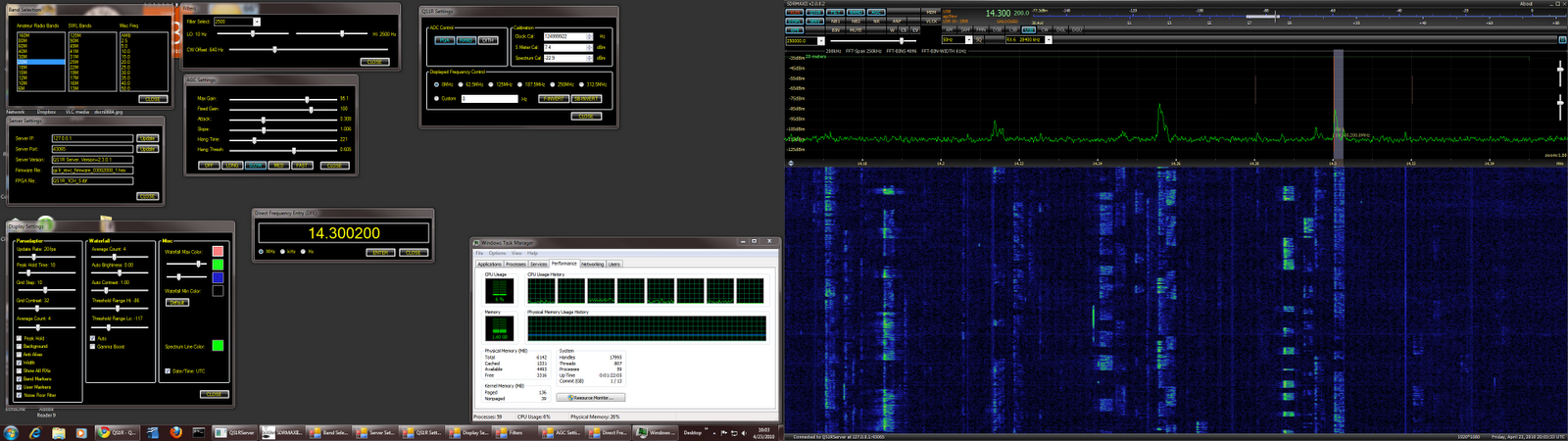
I'm working with the Quicksilver QS1R receiver, a little SDR box that samples the spectrum from 10 kHz to 60 MHz. The hardware seems good, but most of the action for the user is in the "S" part of SDR -- i.e., the software. Take a look at 20 meters in the afternoon - with all possible windows open. (To be fair, you don't need twin monitors -- 3840 x 1080 pixels -- to use this radio!) CPU demand is 6% on my 4 core, 8 thread system, Windows 7 (64 bit). Click for higher rez.

Thursday, November 26, 2009

Why Linux/OSS for Amateur Radio?

How to explain to a non-computer-geek ham what Open Source Software and Linux are all about? OSS and Linux are important to software users the same way a good repair manual and schematics are important to hams. Not every ham knows what to do with schematics, but those who are inclined to open up, understand, repair, and modify their equipment certainly do. Without being able to see what's inside and what connects to what, there is very little you can do. That's exactly why you need to be able to access and work with source code when it comes to software.

These issues will directly affect relatively few hams. Many are "appliance operators" when it comes to software, just as for hardware. For them, a proprietary OS may be a good choice because of its familiarity and the huge choice of available software.

We can admire the dedicated hams who build their own stations and who are on the cutting edge of new hardware technologies. It's the same with software. With software becoming increasingly central to amateur radio (in SDR, digital modes, etc.), competence in coding is getting to be just as important as operating a soldering iron.

While you can roll your own software from scratch, it can be far more efficient (and -- as we like it -- cheaper!) to build your code in the OSS "ecosystem", making use of many libraries and tools that are free for the download. OSS really pays off when you give the fruits of your labor back to the community to spur further development.

These are a few of my open source thoughts!

(a comment on a Linux Journal blog)

Sunday, November 16, 2008

HAUS Software

The OMS utility monitor project is now called HAUS (Home Automatic Utility System). Going for the big time, here!

The Python software is available now on my "static" site:

http://aa6e.net/software/HAUS/index.html

More information about operating experience and preliminary conclusions for the project will be coming.

Original blog post: http://blog.aa6e.net/2008/10/more-important-than-amateur-radio.html

Sunday, October 12, 2008

More important than Amateur Radio?

Yes, my oil usage, my carbon footprint, and ways to evade the financial meltdown. All these have taken me away from ham radio for the moment.

All these, plus one other. I won a little applications contest being held by a company called Plat'Home. They have a line of tiny Linux servers called the OpenMicroServer (OMS 400). These are headless, diskless Linux platforms, based on the RMI Alchemy au1550 chip -- a MIPS architecture device that runs at 400 MHz. A Compact Flash chip can be installed to serve as a hard drive. I use a 2 GB device. Plat'Home supplies a minimal Linux distribution called SSD/Linux, but you can also install Debian. (I haven't gone to Debian yet, but may do so.)

My application was a "Home Utility Support System" - a combination of hardware and software that would monitor operation of the home heating and hot water systems with an eye toward analyzing operations and reducing heating costs.

A prelimary report is available here as a PDF. The installation is shown in the photo at left. (Click on photos for high res.) Physical I/O is through Ethernet connected to a WiFi bridge that hooks into the household LAN, and through the USB to an inexpensive DLP-IO8-G 8-channel data acquisition and control module from DLP Design.

I built a number of interface devices that monitor the state (on/off) of the oil burner, the hot water circulator, and our three heating zone circulators. (Our hot water is supplied indirectly through a heat exchanger that receives hot water from the furnace "boiler".) The DLP interface also supports DS18B20 digital temperature sensors. I use two of these to monitor outside ambient temperature and hot water outlet (pipe) temperature.


The software is all developed in Python to log data every 30 seconds and to do analysis and data plots once a day. A sample run is shown here, as produced by gnuplot software running on the OMS400. The computer also runs the standard Apache web server to make data available to any authorized user anywhere on the Internet.

The work is still in progress, but I have a preliminary interesting, if depressing, result. The idle cycle of boiler (when no heat or hot water is demanded) is about one burst of several minutes every 3 hours. This just maintains the boiler's water temperature in its operating range. At a nominal 1.65 gallons per minute burn rate and with the current price of heating oil, that amounts to some $3.00 a day every day of the year!

Furnace people tell us never to let the system cool down, because of the thermal/mechanical cycling and because of possible corrosion problems, but paying ~$1,000 per year to idle is excessive. (I do dial down the operating temperature in the summer months, but we can't go too far or the domestic hot water will not come to full temperature.)

So there is some incentive to continue this project, potentially saving money (for ham work, of course), saving the environment, and having a little fun by the way.

Many thanks to Plat'Home for their support.

Wednesday, July 09, 2008

The Decline of Fedora

For those few who may be keeping track, here is the OS/distro count at this QTH.

Fedora Linux:1 desktop, 1 laptop (multiboot)
Ubuntu Linux:1 desktop, 1 server
Debian Linux:1 desktop (PPC Macintosh)
Windows XP:1 laptop (multiboot), 1 desktop (as VMware client)

Yesterday, the system manager (that would be me) lost patience with the wife's Fedora 8 system. It's audio stopped working after some system updates. I thought I'd cure that with a "clean" install of Fedora 9. No soap, but maybe it wasn't clean enough...

The last maneuver, before chucking it all and buying a Macintosh, was to install Ubuntu 8.04.1. That worked very nicely! Ubuntu's philosophy and handling of multimedia, not to mention its documentation, is very appealing after the frustrations of Fedora. Fedora is cutting edge, and often has put me into situations where I had to learn more than I wanted about Linux arcana and spend days making things work.

My "big" desktop Fedora system may be next to switch. Unfortunately, there is a lot of stuff to be re-customized in a new environment, beginning with VMware.

Wednesday, May 28, 2008

Fedora-Debian-iMac QSOs

Finally! My mother's old iMac has found a new life on my operating desk. After a number of false starts with Ubuntu and Fedora, I installed extra RAM and Debian's PowerPC Linux, which is now running as an X Terminal against my Fedora-based main computer. This allows me to see my logs and digimode displays on the same desk with the radio, making things a lot more convenient. As a Macintosh, the computer only ran MacOS 8.6, which was nearly unusable for modern Internet work.

I celebrated on 20 meters, working 3D2A (my first Fiji) and then K9QS/0 (the latter with 3.4 Watts output).

Monday, March 10, 2008

Just testing...

Just testing...

This entry comes to you through the "gnome-blog" posting program from my Linux environment. If you can read this, it does work.

I have also tried BloGTK 1.1, which looked even more promising, but it does not seem to give good results with Blogger.com sites, which this one is. It does not treat titles correctly, for example.

Note added: Gnome-blog also appears unable to set an article title. So, maybe it's not going to work out.

Monday, February 18, 2008

QRZPY - A program for QRZ.com access


Here's an old-fashioned (CLI-based!) but useful Python program that lets you create mailing labels and examine and dump records from the QRZ.com XML database. (Online.qrz.com account required.)

The program is developed for Linux and other Unix-like environments, but could readily be adapted for other operating systems.

For mailing labels, qrzpy supports 3 x 10 standard stick-on label stock for your LaserWriter or other printer. Alas, the QRZ.com address data may sometimes overflow the space available (see photo), but such exceptions are reported to the user.

Like most of my Python adventures, it's about the journey of discovering how to do things and perhaps to help others figure out Python programming -- as much as it is the final product.

See my software page www.aa6e.net/software for further details.

Tuesday, January 29, 2008

Z100 -> P100!


After a little discussion with Jack Smith about the inner workings of his Z100 Tuning Aid (last post), one thing led to another.

The result is another little Python utility that does much of what the Z100 does, but in software under Linux.

The scoop and download are available here.

Saturday, October 06, 2007

Bandpass Controls for HF Digimodes

When working PSK31 or other "digimodes" on HF (high frequency) radio, we commonly use computer soundcards to analyze and transmit data. I like to use the Linux program fldigi for this, along with my Ten-Tec Orion transceiver.

The soundcard takes in the entire audio output from the Orion, typically 100 - 3,000 Hz. Fldigi (and similar software) allows you to point to a transmission of interest on a "waterfall" spectral display. This automatically sets the decoder to analyze data in a small band around the cursor using digital filtering.

This works well when the bands are relatively quiet, but when you have a band crowded with strong signals, the signal of interest can be strongly affected by "out of band" signals (but still in the 3 kHz audio region) that key the receiver's AGC (automatic gain control).

In this case, we need narrower IF (intermediate frequency) filtering than 3 kHz. Fortunately, a DSP (digital signal processing) rig like the Orion provides "infinitely" adjustable IF bandpass characteristics, so it is possible to "zoom in" on the signal of interest, largely rejecting any signals outside the small IF passband.

I have written a small Python/wxPython application "oFilter.py" that puts up a panel to allow Orion bandpass control from the same screen as fldigi. (Since fldigi communicates with the Orion via Hamlib at the same time as oFilter, there is a small potential for I/O conflict, but this is not a serious problem.)

Here are a few screenshots to show what is going on. Ultimately, it would be great to integrate the oFilter functions into fldigi or a similar program, using convenient mouse controls.


The PSK31 band at 14.070 MHz with many Europeans
coming in the 3 kHz default bandpass.


"Zooming in" the IF bandpass to 200 Hz,
more-or-less centered on the signal of interest.


Zooming in to a 100 Hz bandpass (minimum available).


The oFilter.py application.