Showing posts with label windows. Show all posts

Tuesday, December 14, 2021

A Death Foretold (Toshiba)

Eleven years is nearly an eternity for computing hardware.  In my IT glory days, we said that a 3 year old PC was effectively at its end of life.  We tried to budget for a 3-year replacement cycle, but it often stretched to 4 years. The technology zoomed ahead so fast that an older computer would barely run the latest operating system and fancier software applications.

That's easy to say when we're talking about other people's money, but for myself, I try to stretch my investments when I can.
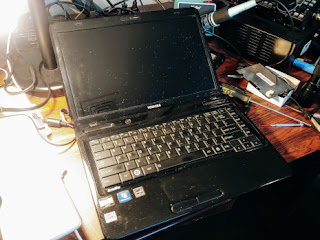
Toshiba L645D
The last laptop computer I acquired was this Toshiba L645D.  In 2010, it was already an economy model selling at a hair under $500.  With its "triple core" AMD processor, you got Windows 7.  Upgraded to dual boot Ubuntu Linux, it served for presentations and other uses for a good 10 years.

Not forever, though.  Recently I brought it out for some reason and found that its battery would not take a charge.  (I was on my second battery.)  OK, new batteries are available for about $25.  I got one, and verified that it would charge up normally, according to the LED indicators.  So I pushed the power button, but apart from a few LED flashes nothing more happened.  No display, no boot.

OK, there's another battery to check.  The "CMOS" battery is a 3-volt lithium cell, like the one that probably lives in your PC.  You have to unbutton your machine and dig for it.  I dug for mine, but it popped up and out and into the internals of the laptop.  Oops.  That means I have to disassemble the machine -- not a simple task.  Fortunately, there are good instructions at ifixit.com for just this system.

I got it apart and found the battery OK, and I was set to put in a new one.  But the battery holder was a flimsy plastic item that I had broken when I removed the old battery.   Yikes!  Amazon had a replacement that seemed compatible, so I ordered it and waited a couple of days.  (10 of them for ~$7.) Removing the old holder and putting in the new one required some semi-precision soldering, but it seemed to go alright.

Reintegrating the laptop parts (a 20+ step process) went not quite as smoothly as the disassembly, but well enough.  I only had one small screw left over.

Alas, the Toshiba did not come to life!  I am now reflecting on why I would put so much time into a system that at best would still be obsolete.

At least I do have a new battery pack and an 11 year old 320 GB SATA hard drive for the junk box.

Saturday, July 08, 2017

Things that can't be understood

My "fancy" homebrew computer (not pictured here) has been running nicely for about 8 years. It was big and powerful in 2009, using the new Intel Core i7-920 chip, with lots of RAM and lots of cooling.  Nowadays, Gimli (as I call it) runs mostly Windows 10, with a touch of Linux.

It runs up to 8 background threads simultaneously, running up some nice statistics with BOINC -- the science "@home" brokering site. Maybe we've discovered a pulsar or two, who knows?

This was alongside my "real" work which has been operating my ham radio station -- running SDR radios, logging, digital mode operation, etc.

That was until a few weeks ago, when Gimli started failing -- stopping suddenly with no blue screen of death or software logging, just a blank screen.  I thought maybe my checkered past as an overclocking experimenter was catching up with me.  I tried going back to the absolute minimal BIOS settings just in case.

I starting checking out what I might need to buy to upgrade this "ancient" machine through Newegg or Amazon -- and the discussions I'd need to have with the XYL.  Yes, there are many new options on the market.  The biggest one might be the advent of SSD technology (Solid State Disk).

As a last stand, I thought I'd check out the computer as best I could.  It's practically impossible to find a fault of the kind I was having.  You'd just have to replace key components one by one until it started working again.

Opening the box and blowing out the dust, I started wiggling the cables and re-seating the connectors. I pulled out the two RAM modules and "cleaned" the contacts (wiping with fingers), and I plugged them back swapping their positions.

Naturally when I put things all back together, Gimli came to life and hasn't crashed for a week or so now.  Maybe we're go for another 7 years?

Or maybe we're running on fumes.

Saturday, August 06, 2016

Windows 10 "Anniversary Update" & Ham Radio

There are 3 Windows 10 systems in the house.  I chose the least important one (a Toshiba laptop) to be the first sacrifice for the latest Microsoft update.  These updates are big deals.  This one took nearly 2 hours start to finish, and it had me go through the new installation checklist to decide what data gets shared with Redmond.  (I generally minimize that, hoping to keep a smidgen of privacy.)

The good news, apart from the long waiting for things to complete, is that my laptop is back to what it was before. Supposedly, there are benefits in the user interface -- more Cortana, etc., but they can be ignored fir the time being.

The truly worrying part of Windows evolution is that MS is asserting ownership of my data and my computing life in more and more ways.  In the name of "convergence", my PC is morphing into a cell phone, and I find myself slipping into the MS walled garden.  Why, it's enough to keep me on Linux for most of my work!

Unfortunately, I do need to keep Windows around for my Amateur Radio operations -- running the Flex 6500.  That is my "big" computer.  It will be the last one to be updated, given that the Flex software may need special TLC when there's a major Windows update.