Showing posts with label computing. Show all posts

Tuesday, December 14, 2021

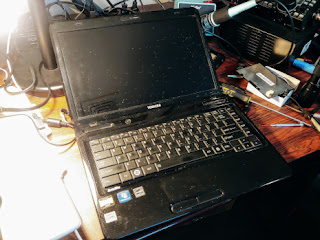
A Death Foretold (Toshiba)

Eleven years is nearly an eternity for computing hardware.  In my IT glory days, we said that a 3 year old PC was effectively at its end of life.  We tried to budget for a 3-year replacement cycle, but it often stretched to 4 years. The technology zoomed ahead so fast that an older computer would barely run the latest operating system and fancier software applications.

That's easy to say when we're talking about other people's money, but for myself, I try to stretch my investments when I can.

Toshiba L645D
The last laptop computer I acquired was this Toshiba L645D.  In 2010, it was already an economy model selling at a hair under $500.  With its "triple core" AMD processor, you got Windows 7.  Upgraded to dual boot Ubuntu Linux, it served for presentations and other uses for a good 10 years.

Not forever, though.  Recently I brought it out for some reason and found that its battery would not take a charge.  (I was on my second battery.)  OK, new batteries are available for about $25.  I got one, and verified that it would charge up normally, according to the LED indicators.  So I pushed the power button, but apart from a few LED flashes nothing more happened.  No display, no boot.

OK, there's another battery to check.  The "CMOS" battery is a 3-volt lithium cell, like the one that probably lives in your PC.  You have to unbutton your machine and dig for it.  I dug for mine, but it popped up and out and into the internals of the laptop.  Oops.  That means I have to disassemble the machine -- not a simple task.  Fortunately, there are good instructions at ifixit.com for just this system.

I got it apart and found the battery OK, and I was set to put in a new one.  But the battery holder was a flimsy plastic item that I had broken when I removed the old battery.   Yikes!  Amazon had a replacement that seemed compatible, so I ordered it and waited a couple of days.  (10 of them for ~$7.) Removing the old holder and putting in the new one required some semi-precision soldering, but it seemed to go alright.

Reintegrating the laptop parts (a 20+ step process) went not quite as smoothly as the disassembly, but well enough.  I only had one small screw left over.

Alas, the Toshiba did not come to life!  I am now reflecting on why I would put so much time into a system that at best would still be obsolete.

At least I do have a new battery pack and an 11 year old 320 GB SATA hard drive for the junk box.

Monday, October 02, 2017

A little NUC on my desk


When my 8 year old computer, home built with a Core i7-920 processor, began freezing up randomly, a new generation computer was in order.  The only application I normally use that takes significant computing power is FlexRadio's Smart SDR for Windows that needs to control the Flex 6500 SDR transceiver.

Recent SSDR versions are much less demanding than they used to be, so maybe I could make do with a "downgrade" to a Core i5 system.  Intel processors divide broadly between "i3" (dual core), "i5 (dual core, with hypterthreading yielding 4 threads), and "i7" (quad core, 8 threads).  Of course, the later chips ("generations") in each category will be a lot more powerful than the earlier ones.

After some debate, I selected a Intel NUC (next unit of computing) tiny computer configuration in "kit" form.  You need to supply your own SSD (solid state disk) or hard drive and your own DDR4 RAM.  The NUC is available in quite a few versions, but I ended up with the Intel BOXNUC7I5BNH kit, which is a "7th generation" i5 box with room to add a 2.5 in. SSD or HD.

I installed a Samsung 960 EVO Series - 250GB PCIe NVMe internal SSD, which uses the (relatively) new M.2 interface and leaves the 2.5 in. bay free for the future.  Two 4GB DDR4 RAM chips complete the kit.  Assembly is trivial, if you're at all familiar with computer innards. Installing Windows 10 Home from a USB memory stick was quick. Transferring data and software from the old system was simplified by staging files onto an external USB hard drive.

After all that, we have a very fast little computer.  The Passmark benchmark comes out at 3,644, which is roughly 60% of the score of the old i7-920 with GT640 graphics -- but with half the cores and only on-chip graphics.  The NUC is happy to drive my two HDMI displays, although the second display requires a Thunderbolt/USB-C to HDMI adapter cable.  SSD I/O performance is blazing!

But what about Flex SSDR?  That's the primary app for this computer -- when I'm not using the Flex Maestro controller.  Here are some results:

Panadaptors |
window size |
CPU utilization |
Network Mb/s
1
1/4
15%
2.4
1
full
20%
2.7
4
full
33%
6.0
4*
full
44%
9.4
4*
1/4
36%
7.2
(* maximize spectrum frames per second and waterfall rate)

The worst case CPU load (44% across the 4 i5 threads) seems to be a comfortable number.  The Flex 6700, on the other hand, with its maximum 8 panadapters might have trouble, if that's your operating style.

The NUC handles the required load with capacity to spare.  It uses much less power to run and has only about 1/60 the volume of the old system, fitting easily on the desk.

Saturday, July 08, 2017

Things that can't be understood

My "fancy" homebrew computer (not pictured here) has been running nicely for about 8 years. It was big and powerful in 2009, using the new Intel Core i7-920 chip, with lots of RAM and lots of cooling.  Nowadays, Gimli (as I call it) runs mostly Windows 10, with a touch of Linux.

It runs up to 8 background threads simultaneously, running up some nice statistics with BOINC -- the science "@home" brokering site. Maybe we've discovered a pulsar or two, who knows?

This was alongside my "real" work which has been operating my ham radio station -- running SDR radios, logging, digital mode operation, etc.

That was until a few weeks ago, when Gimli started failing -- stopping suddenly with no blue screen of death or software logging, just a blank screen.  I thought maybe my checkered past as an overclocking experimenter was catching up with me.  I tried going back to the absolute minimal BIOS settings just in case.

I starting checking out what I might need to buy to upgrade this "ancient" machine through Newegg or Amazon -- and the discussions I'd need to have with the XYL.  Yes, there are many new options on the market.  The biggest one might be the advent of SSD technology (Solid State Disk).

As a last stand, I thought I'd check out the computer as best I could.  It's practically impossible to find a fault of the kind I was having.  You'd just have to replace key components one by one until it started working again.

Opening the box and blowing out the dust, I started wiggling the cables and re-seating the connectors. I pulled out the two RAM modules and "cleaned" the contacts (wiping with fingers), and I plugged them back swapping their positions.

Naturally when I put things all back together, Gimli came to life and hasn't crashed for a week or so now.  Maybe we're go for another 7 years?

Or maybe we're running on fumes.

Saturday, August 06, 2016

Windows 10 "Anniversary Update" & Ham Radio

There are 3 Windows 10 systems in the house.  I chose the least important one (a Toshiba laptop) to be the first sacrifice for the latest Microsoft update.  These updates are big deals.  This one took nearly 2 hours start to finish, and it had me go through the new installation checklist to decide what data gets shared with Redmond.  (I generally minimize that, hoping to keep a smidgen of privacy.)

The good news, apart from the long waiting for things to complete, is that my laptop is back to what it was before. Supposedly, there are benefits in the user interface -- more Cortana, etc., but they can be ignored fir the time being.

The truly worrying part of Windows evolution is that MS is asserting ownership of my data and my computing life in more and more ways.  In the name of "convergence", my PC is morphing into a cell phone, and I find myself slipping into the MS walled garden.  Why, it's enough to keep me on Linux for most of my work!

Unfortunately, I do need to keep Windows around for my Amateur Radio operations -- running the Flex 6500.  That is my "big" computer.  It will be the last one to be updated, given that the Flex software may need special TLC when there's a major Windows update.

Monday, January 11, 2016

More Network Fun: Asus, HP, and Xfinity

Asus RT-N66U (l), Cisco/Xfinity DPC3941T (r)
...in which we demote the Asus RT-N66U.

Faithful readers know about my efforts get reliable networking here at home (last post).  I want IPv6 to work well, and I'd like all my devices to freely work together, with good Internet access.

We took 2 steps forward, and then 1 back.  IPv6 worked, but not reliably when I set up the Cisco DPC3941T for "bridging mode" and gave the routing function to the Asus RT-N66U.  ICMPv6 packets were displaying lots of errors.

We ran the house that way for about a month.  Everybody was happy (in an IPv4 way), but there was one significant problem. Our HP LaserJet Pro MFP M127fw printer was not working reliably.

HP LaserJet Pro MFP M127fw

This is an "all in one" B&W laser printer / scanner / fax system offering lots of capability for a reasonable price.  It offers WiFi, Ethernet, or USB interfacing.

Everything works fine on Windows.  After a detour through HP's website, it works on Linux, too.  It works with Google's Cloud Print service, and HP's ePrint.

It worked for a while, but then would go catatonic and refuse new jobs after a period of minutes or hours.  You could always get it back by cycling the AC power.  We lived with this for some time, but it's pretty annoying to start a print job from the other end of the house, only to find out later that it did not go through.

So we tried a lot of tricks, adjusting the printer's setup, the router's setup, and even the Linux driver installation.  (The problem showed up with either Linux or Windows.)  We updated the printer's firmware. We tried both WiFi and Ethernet connections. 

Cut to the chase.  Eventually we cut out the Asus router, and there was progress.  Using the Cisco/Xfinity/Comcast router by itself, the printer worked -- and IPv6 worked, too!  It is clear that the Asus/Cisco combination (if not the Asus alone) is problematic for HP and IPv6.

So we retreat another half step.  We still use the Asus box as our main WiFi access point.  The Cisco 2.4 GHz WiFi transmitter is much weaker (nearly 20 dB weaker) that Asus, and it's built-in antenna system is doubtful.  (The Cisco box may actually be defective.)

For the moment, printing works, IPv6 works, and we will stop there.  The problems we had originally with Xfinity's DHCP and other issues of that sort are still there, but overall it's time to relax.

Sunday, October 20, 2013

Station Computer Upgrade

I had enough!  My creaky Intel Atom-based computer had enough oomph with Ubuntu to run fldigi, but just barely.  It couldn't handle a browser and logging program running alongside very well. So the D945GCLF motherboard supporting an Atom 230 processor and 1 GB of RAM is now surplus. (See right.) Note that it has on-board serial and parallel I/O ports - a rarity now! (I originally chose the Atom board as an experiment to see how small a processor was really necessary. I answered that question.)
Upgrading was straightforward.  I could keep the power supply, case, DVD drive, etc.  The board is an MSI B75MA-P45, which will run many current Intel chips.  (Left) I selected the "Celeron" G1610 (2.6 GHz, 2 cores) to run with a "mere" 2 GB of RAM.  Choosing the configuration was helped quite a bit by Ars Technica's "Bargain Box" System Guide. My logic was that any new system, even a "bargain" system, would be way better than what I had been using.  And that has proven correct.

The hardware change went smoothly enough.  The real work (no surprise) was building the new Ubuntu environment with needed development tools and Amateur Radio applications. It will be some weeks before we get all the way back to equilibrium.

Added: I ran the BOINC Whetstone and Dhrystone benchmarks on the G1610 and then on my "big" i7-920 machine.  For 2 cores, the G1610 gives 2768 floating point and 16928 integer MIPS per core. For 2 cores (of 4), the i7-920 delivers 2869 floating and 16577 integer per core.  So core for core, today's "budget" CPU is comparable to a premium chip of a few years ago.  Such is Moore's Law. The '920 will run 8 independent execution threads across 4 cores, giving it 2-4 times more potential in terms of throughput. In practice, that throughput is only realized when I'm cranking 8 threads of BOINC apps, which is a nice thing to do, if your tastes run to extraterrestrial intelligence, pulsars, or gravity waves.

Purists will note that Whetstone and Dhrystone aren't great benchmarks, and I'd have to agree. All I will say is, they came easily to hand, and they're better than BogoMIPS.

Wednesday, December 12, 2012

Chromebook printer gotcha

The Samsung Chromebook (previous post) is a fine little machine. Simple setup, simple operation. What could go wrong? Well, try to integrate it with your home network! You can't directly connect to anything, like your printers on the network. (There are SSH and FTP apps, but they seem to work through a proxy outside the local net.) Google wants you to use its Cloud Print service (beta!), which allows you to print to a file in the cloud which is then queued for any cloud-connected print server for which you have permission.

It's on you to create a cloud print server for your local printers if you want to print from the 'book. To do this, you must 1) log in to your PC (under your ID of course), 2) run the Chrome browser, 3) set up a server process, and 4) configure sharing with any Google IDs you want to have printing. Your local PC becomes a server (and it has to be turned on), and you have to be logged in.

It's a little more complicated than that for us, since we have a number of local PC user accounts between several family members. The print server has to be configured separately for each user who might be using the PC, and each user has to share the access properly. There is no simple way to run the server as a daemon or service. (It can be done, however. See this article for a Linux method.)

What they really suggest you do is to buy a new Cloud Print friendly printer, with the server capability built it.  HP calls this "ePrint". There are quite a few models available in a low to moderate price range.  For example, the HP 6600 all-in-one. Turns out we've got the HP 6500, with no Cloud Print...

That adds $100 or so to the price of the Chromebook.  Caveat emptor.

Friday, November 04, 2011

Hackers I have known

I've just finished "Hackers: Heroes of the Computer Revolution" by Steven Levy.  Originally published in 1984, the book chronicles the early days of computing, when giants strode the earth... It is out in a 25th anniversary edition.

Naturally, and without too much shame, I read it on the Kindle. (If you haven't read the book, see below to appreciate the situation.)

I suppose, by Levy's account, I was on the fringe of the second generation of hackers.  (or maybe generation 1.5)  I crossed paths with a couple of the figures mentioned in the book.  Unknowingly, there may have been more who I never met by name, but who inhabited the same spaces I did.

Bldg 26 -- It never looked this good!
I was a graduate student at MIT from 1966 to 1971, working in Building 26, the Compton Lab. (Levy has unkind words for grad students who were always trying to get things done with the computers, as opposed to the hackers who were building a little utopia around neat code and the "hacker's ethic".  But I will let that pass.)

I began my career at MIT with a couple of computing projects. (I was a physics student working in radio astronomy, but computers have always been central in my world.)  First, a re-reduction of Prof. Bernard Burke's 234 MHz Sky Survey data, which I inherited from other hands.  That project never really finished, and for all I know, someone is still working on it!  It was a great chance to learn the ropes of "glass house" computing, using the IBM 7094 system on the first floor.  It was a true glass house, having magnificent viewing windows from the first floor corridor.  This was a batch system, using punched cards and magnetic tape for input.  You waited hours for a print-out to come back.  A second 7094 system in the same room hosted the CTSS timesharing system, but that was too expensive and not quite powerful enough for my project.  This was all using the new Fortran IV language.

My more respectable work (in hackers' terms) was in connection with a later project, where we had to analyze radiometer data collected on punched paper tape.  We were setting up to measure the "3 degree" cosmic background radiation.  This analysis really needed an interactive analysis, where we could edit and calibrate the data with successive refinements.

So I was introduced to the DEC PDP-1 computer on the second floor.  It was the late 60's, and I was largely unaware of the glorious history of that system and its earlier sister machine, the TX-0 in the next room.  Levy's book fills in a lot of details for me.

MIT PDP-1
The PDP-1 had been expanded to a small timesharing system, supporting 4 terminals.  There was an early graphics display that you addressed in a very simple way: set X, set Y, beam on, beam off -- as I recall.  No driver software! We used a software system called "Stargazer" developed by Eric Jensen. I presume he was the same person mentioned by Levy as "Jensen".  I remember him as an affable but maybe quirky fellow, who had another passion as a comic diver at the MIT pool.

The PDP-1 was a wonderful system, everything was assembler code (of course!) with some exotic peripherals for the time.  A Calcomp plotter (which we used one year to make individualized snowflake Christmas cards) and a nice sound system that played a respectable "Eine Kleine Nachtsmusik" in 4 part harmony, IIRC.  I remember one day when the engineers wheeled in a new electronics crate.  They took the system down for a time, and then lo we had a new "index register" in our instruction set.  Magic.

Several years later, probably about 1969, I needed to make photographs of pulsar data -- time vs frequency for pulses dispersed by the interstellar medium. It turned out that the ancient (by that time) TX-0 computer had a magnetic tape drive and a suitable display and camera.  It was easy to get time there, since most of the action revolved around the PDP-1.

MIT TX-0
The TX-0 was truly amazing.  It had the power (maybe) of an Apple II, but it was built on a large collection of relay racks spread around a good sized room.  It was said to be the first computer to have used transistor-driven magnetic core memory.  (Levy goes into the history of this machine, but does not dwell on its technology.)  One feature stood out in particular.  It was a wonderful thing to turn the system "on".  It was not simple.  You turned on power, but then you had to start the processor clock.  The clock consisted of a sequence of variable delay lines connected in series and then wrapped around to make a loop.  (Several clock phases were needed to sequence the logic correctly.)  You had to wait until the electronic delays were stabilized (they were probably vacuum tube devices).  Then you pressed the "start" button that injected exactly one short pulse into the loop that started everything going.  It's safe to say I've had a higher interest in power-on sequencing since those days.

We got advice and help from John McKenzie, who was the support engineer for the TX-0 mentioned in Hackers.  I remember him as gracious, supportive and tolerant with us newbie students.  I would put him alongside D. Cosmo Papa, Jack Barrett, and a number of other engineers and technicians who really kept MIT and MIT students running right in those days.

Today's open-source software movement is a direct descendant of the original hacker generation.  Many of the early struggles still resonate.  "Information wants to be free."  Aggressive efforts to impose overbearing intellectual property rules and DRM (digital rights management) really need to be opposed.  Maybe we aren't seeking a free information utopia, but we do need to understand that creative expression (and programming) are always built on the foundation of earlier works.  Mickey Mouse can't be "owned" forever.

It may be that a true hacker would never be caught dead with the DRM-heavy Kindle, but some of us have mellowed at least a little.
Saturday, October 08, 2011

The Beagle Has Landed!


The Beagleboard is an open-source hardware project developed around an ARM Cortex A8 processor (TI OMAP3 family). See Beagleboard.org for the general scoop. The Beagleboard-XM shown above sports the DM3730 1 GHz processor with 800 MHz DSP, 512 MB RAM, 4 GB micro SD "disk", 4 USB ports, 10/100 Ethernet, HDMI video, audio in and out. Oh, and an old-fashioned serial port. It is about 3" square and draws 2.5 W on a 5 V power supply.

That's all the hardware you need to run a slew of interesting applications. First, there is Angstrom Linux, which is a distribution tailored for embedded systems. There is also a version of Ubuntu being developed. And you can run other ARM environments, too. Android, anyone? Forth?

I'm interested in some ham applications along the lines of remote control, such as remote receiver systems for HF. The hardware is wonderful, but it's clear that 99% of such a project is software.

Google reveals a number of ham applications already out there:
I'd like to hear of others that are active. The net is littered with projects that have been announced in ambitious terms, but aren't heard from again.

Wednesday, November 10, 2010

VAIO inverter surgery

My Sony VAIO (VGN-FS710/W) gave up the ghost last month. The screen went dark, and it emitted some screechy noises.  I figured what a hardware service call would likely cost, and I decided I quickly needed a new laptop to support my work at ARRL and other things. So I sprang for a new inexpensive Toshiba (Satellite L6460), which did not cost much more than that hypothetical service call.

Now, after my computing situation has stabilized, I had a chance to open up the VAIO to see what could be done.  There were some helpful disassembly hints on the Internet, and they were essential to avoid breaking things.  The culprit almost leaped out at me.  It's the tiny inverter card (above) that makes high voltage to run the fluorescent LCD back light.  The Internet (again) seems to be saying this is a frequent source of problems.  The HV rectifier was charred and broken, so obviously this was the problem.  It's a $50 part, and I hope replacing it will solve the problem.

I suppose there's a moral here.  I could have saved money, but incurred opportunity cost and risk, if I simply repaired the VAIO.  I'm happy to have a new, more powerful laptop. Still, the VAIO is handy because it has some critical features (like Firewire) that make it very useful for some of my work.

Update (11/12/2010): Thanks to lcdparts.net, I have a new inverter, and the VAIO is back in operation!

Sunday, January 24, 2010

Wondering about AMPRnet

Do you know about AMPRnet? I've wondered about this mythical network off and on since the 1980's packet boom. Back then, I was doing 1200 bps 2-meter packet from my home in Guilford, CT. I had a nice little setup with a toaster-style Macintosh, a KAM+, and a 10-20 Watt transmitter (Handytalky with an amp.). It would do the usual packet thing -- access local BBSs, digipeaters, etc. With a lot of effort, I could connect through RF gateways into New York or the Boston area. It was kind of fun sitting there and listening to each packet going out and (hopefully) returning. Not useful, by any means, but entertaining.

Then I got the TCP/IP bug. On the one hand, this was a loser for performance, adding all the overhead of full routing to each packet. On the other hand, there was a degree of error control, and I had actual IP addresses assigned to me! I was 44.88.4.9 (aa6e.ampr.org) and 44.88.4.10 (aa6e-1.ampr.org). So far as I know, the IPs are still "mine", but the server ampr.org has forgotten about me. :-(

There is a "Class A" network assignment for AMPRnet or "ampr.org" -- 44.0.0.0, or as we now say in CIDR terms, 44/8. That's a big deal. That is an allocation of 2**24 = 16,777,216 individual IP addresses, about 1/256 of the entire IPv4 address space, assigned to Amateur Radio. That's the same IPv4 address space that is supposed to be exhausted as soon as 2011.

AMPRnet appears to be very lightly administered (and that's being polite) -- even for an amateur radio activity. The allocations are supposed to be managed by regional volunteers, but coverage seems spotty. The advertised coordinator for my area seems to be inactive now, so there is no one for me to even ask about my allocation! And, if you can get a number, it doesn't have much value, since no one can route packets to you unless you make "upstream" arrangements that are impractical for individuals. People seem to set up tunnels to a server at ucsd.edu, which probably works, but is hardly the way to build a big network!

Traditional packet radio has been in long decline, except for special uses like APRS and DX spotting. Newer digital developments, such as DSTAR and HSMM use TCP/IP technology, since it's still the standard for computer networking, and they may use AMPRnet addresses.

What about that 44/8 network? Is there any way, other than history, to justify maintaining that huge allocation in the face of a global IPv4 number shortage? I know of no simple way to find out which ones are allocated. I would be surprised if there were as many as 1,000 in use. Out of 16 million, it's a trivial number.

The simple fact is that amateurs got a Class A allocation in 1992, when people weren't asking many questions and commercial use of the Internet was just beginning. We'd never get it today.

We should ask why amateurs actually want any IP number assignments. Wouldn't we do just as well with a non-routable private network like 10/8? The vision that somehow a random Internet user needs to interact with a random Amateur Radio station is an odd one. If it involves RF transmission, only licensed operators are allowed -- although the status of server based systems like e-mail and the web may be unclear. It's 2010, and we have 20 years of Internet and ham radio development to look back on. Ham digital nets are fragmented and don't talk to each other much, let alone the Internet as a whole. Why do we need full routability between the RF world and the Internet?

The Internet <--> ham model that is working is tunneling through the Internet to interconnect radio devices and computers. Echolink, IRLP, and DSTAR rely on this mode. No permanent ampr.org addresses are required. An RF-to-Internet gateway is generally at someone's house or place of work, where there is a standard Internet Service Provider connection. The gateway relies on the ISP's assigned address, just as we all do for domestic service.

So maybe AMPRnet needs to be put to rest, giving its water back to the tribe. That would make a nice press release: Public-spirited amateur radio operators help the Internet put off catastrophe for 2 months!

Or, maybe I'm missing something important. Let me know in the comments!

Jeff, WA4ZKO, has some good comments here and here.

Saturday, September 05, 2009

Amateur Radio vs HPC & OSS

Lately, I've been wondering what aspects of Amateur Radio would benefit from high performance computing technology. This is prompted by my latest PC - built around an Intel Core i7 processor with 6 GB of RAM. This CPU has 4 cores and 8 logical (hyperthreaded) processors. The benchmark results are very nice: 20,500 Whetstone MIPS (floating) and 45,200 Dhrystone MIPS (scalar) across 8 simultaneous threads. [BOINC's built-in benchmarking - not to be taken at face value!] In addition, we have graphics processors (GPUs) that can be programmed with CUDA, OpenCL, and similar methods.

Some general areas that occur to me:

  • Digital Signal Processing (Audio-ish) - This is the technology behind much of today's Software-Defined Radio (SDR). A significant amount of processing is required for mixing, modulating, and demodulating signals. Dynamic spectral displays are useful. However, the actual amount of horsepower required for typical amateur applications is fairly limited. In most cases, the bandwidth of interest is less than 128 kHz (the range of high-end audio cards for band monitoring displays) and very often less than 3 kHz - the maximum audio bandpass of most communications transceivers. As long as we are working with audio-type signals - PSK31, Olivia, RTTY, and SSB, we are not likely to tax the latest CPUs. You can use more power if you want to listen to many channels at once, but even so...
  • DSP (Video) - Modern HDTV signals require a lot of processing. In production work, this would mostly be done in special-purpose processors (I think), but amateurs might prefer to operate with commodity PC and GPU hardware. I am not aware of amateur HDTV work for over the air transmission, but there may well be some. My initial look at HDTV (and DTV) was discouraging. The sheer numerology of options is overwhelming -- although of course, you may only need one mode for ham work.
  • DSP (Video 3D) - How about ham communications through 3D immersive environments? Four-pi visual fields, multichannel sound: you could get the gamers into that! (But why ham radio? Why not FIOS-type connections? We can offer off-grid operation and mobility away from cell towers!)
  • Radio Science - Propagation Analysis and Prediction through detailed atmospheric modeling, ray tracing, etc. This could be extended to real-time monitoring of the HF bands at points around the world, and trying to build up a real-time DX prediction service.
  • Exotic wideband signalling. Using microwave bands and pursuing highest bandwidths. Would this be more a question of very fast D/A conversion and I/O more than general purpose computing?

There must be more areas for HPC in Amateur Radio. As a long-time HF operator, I'd like to be able to translate CPU power into greater sensitivity and interference rejection. We can certainly consider computationally intensive modulation and demodulation schemes, but it's not clear what returns are available in a channel's SNR given the practical limits on transmitter power, modulation bandwidth, antennas, etc. The ionosphere degrades the signal so that frequency resolution below about 1 Hz or so is not going to be very productive. How can a "supercomputer" overcome that?

Ideas, anyone?

[This is cross-posted with my SourceForge blog: http://sourceforge.net/userapps/wordpress/aa6e/. Why do I have an SF blog? For topics relating to open source software, to see what WordPress is all about? Something like that!]

Friday, August 21, 2009

Atomic Disintegration

My new, humble computer based on Intel's Atom CPU was a great little project at a low cost. It benchmarked at about half the performance of my older Athlon XP 2000+ on a per-thread basis, and it provided two hyperthread "processors" for Linux to use. All for about $64 for the board and CPU. (And it is 64-bit capable, but the value of a 64-bit OS is unclear in such a small system.)

Then, for larks, I set it up to run as a member of my World Community Grid effort. That had it running two threads for 24 hours a day. This was somewhat pointless, given that the new Intel Core i7 system is so much more powerful*, but it did manage to churn out some work-units for the Cause.

All was well for about 4 days. Then ping!, the Atom froze. I could reboot into BIOS sometimes, but couldn't load Linux or even memtest86+. An actual hardware failure -- I haven't seen many of these in recent years.

Over a period of days, I got more acquainted with my UPS driver, as I tried substituting various parts. Suspecting the hard drive or CD/DVD drive (old IDE technology). Tried a substitute 1 GB DDR2 RAM. No help.

So the fault was either in the Intel D945GCLF motherboard or the power supply. The motherboard has about 10 million times more transistors, so that seemed the likely culprit.

Using Amazon.com's amazingly efficient returns/exchange process, I had a new mobo in quick order, and all now seems well.

Do I dare run the WCG application any more?

As to ham radio, this system is my logging and digital modes computer for AA6E. We were dead in the water. I could have fallen back to my mic or key and used paper logging, but I wasn't quite that desperate!

--
* Both in absolute (45,232 MIPS vs 3,060 MIPS) and in power-specific terms (302 MIPS/W vs 64 MIPS/W).

Tuesday, August 11, 2009

Grid Progress

The big application for Gimli (Intel Core i7 system, described earlier) has been participation in the World Community Grid, which is an IBM-sponsored project for channeling volunteer computer systems into a "grid" that can apply supercomputer-level power to selected scientific problems, mostly in life sciences. WCG uses the BOINC framework from UC Berkeley. There are many other grid projects using BOINC, and that's where most of the physical sciences and math projects seem to be. (And where my sympathies really lie. I may have to jump off the WCG ship eventually.)

My desktop system is "competing" against zillions of computers (1,328,064 "devices" under control of 468,410 "members"). On the one hand, many members have tried the project but have not actively contributed. On the other, many of the members command fleets of computers in academic or industrial settings, and are able to direct much of their otherwise wasted CPU cycles to the WCG.

In my case, my one computer, running 8 parallel threads, delivers about 8 days of "computing" for every calendar day. My rank in the WCG project is improving on a daily basis. About 30,000 members have provided more processing power (over the lifetime of the project) than Gimli has in about 6 weeks. We'll never be #1, but we should be able to climb the ladder for some time to come.

Remarkably, Gimli is able to run 8 CPU-bound jobs around the clock (at low "niced" priority) without significantly affecting interactive work - - browsing, email, office applications, etc. Only in a few cases is there a noticeable slowdown, e.g., firing up a large VMware image to run Windows XP.

Readers of this blog may ask what all this has to do with Amateur Radio - our raison d'être. That's a good one. I am looking for ham applications that can profit from high-power desktop computing. You might think that Software Defined Radio would be one, but the SDR work I know of really works well in smaller-scale systems. Digital video would be a candidate. Do you have suggestions?

Friday, August 07, 2009

Gimli Perfected

If you read my earlier post, we left this new Gimli system (Intel Core i7 920) on the edge in terms of operating temperatures and cooling. We experimented with ducting and undervolting and got almost to the point of running at an acceptable temperature at full CPU load. Almost, but not quite.

The problem was Intel's default stock chip cooler system, which is marginal if you want to run full out for an extended period. Marginal, at least, if you don't implement their recommended side ducting system.

I wanted to get this problem solved so that I will not have to watch my operating temperatures so closely while running BOINC or other intensive applications. After some research, I ordered the Cooler Master V8, a large heat pipe / radiator / fan system that fills up my computer case very nicely. (Leaving a little room, but not much, for hooking up the wiring afterward. This kind of assembly is not for everyone.)

The following photo gives an idea of the scale and airflow. The flow from the cooler's embedded fan conveniently goes directly to the case's rear exhaust fan.
The bulk of the radiator system really does take up nearly all the volume above the CPU, but fortunately there were no mechanical interferences on my Gigabyte EX58-UD4P motherboard or RAM. The whole thing just fits in the Antec case without trouble. It does weigh almost 900 g (about 2 pounds). While the motherboard mounting seems fairly secure, I am sure that my computer will not fare too well if dropped on a concrete floor.

Results

The quick before and after comparison, with my undervolted i7 (Vcore=1.01250 V):

Temperatures are (Tgpu, Tcore, Tamb, Tchip in deg. C)
8 threads of BOINC code (Proteome Folding Project)

Before: 48, 80, 39, 75
After: 45, 52, 36, 45

The final (chip) number is the best one to focus on. An improvement of 30C is a lot more than I had expected, but I will accept it! This is all with the cooler fan running at 1767 rpm. It will run up to about 1970 rpm, but that noticeably adds to the noise level. The higher speed does not lower the operating temperature by much. We might need to speed up the case's exhaust fan if we care about cooling more than noise. (I don't!)

I should emphasize that "normal" interactive computer operations would be much less than the 100% load we are discussing here, so that even the stock Intel cooler would be fine. On the other hand, if you are spending the money for the i7 system, why wouldn't you want to run it full blast?

According to my (perplexed) intuition, having read much of the Intel literature, it should be fine to run at a chip temperature of 60 C, at least. So there is a lot of headroom to explore overclocking with higher core voltages.

Sunday, August 02, 2009

New Atom System

The latest computer system to come to life here at AA6E is based on the Intel Atom 230 processor. The Atom (out for a year now) uses the latest 45 nm fab technology for a chip that is optimized for low power consumption, but it supports either 32- or 64-bit operating systems and hyperthreading, giving the appearance of a dual-core system to the OS.

I bought the Intel D945GCLF board, which has the mini-ITX format -- it's really small compared to my other ATX and mini-ATX systems.

Intel D945GCLF Motherboard and Atom 230 Processor

The board mounts nicely in a spare Mini-ATX computer case, with all kinds of room to spare. I attached an older 20 GB hard drive and DVD to the legacy IDE port. Eventually, I may repackage the system into a smaller case, with more modern IO devices. But one of the nice features of the motherboard is its support for ancient interfaces -- Serial, Parallel, PS/2 Mouse, keyboard, and IDE, along with newer SATA, USB, etc.

The focus for me was low power consumption and low out-of-pocket cost. The CPU is supposed to require only 4 W and the basic board was $64 at Amazon, including CPU but no RAM. The major glitch building the system was that my numerous old PC power supplies did not supply the ATX12V connector (the 4 pin 12 V CPU power connector) or any SATA-style connectors. So, while I might have been able to wire up some connectors to use with an older supply, I sprang for a new unit. Selecting one was not as easy as it might have been. The power demand is minimal (under 100 W), but if you want "quality" (efficiency, power factor, noise filtering), those features are promoted for larger supplies. I ended up with a 500 W, $35 unit.

Performance

A thorough review of an Atom 230 system is available at Tom's Hardware. I did some testing that is more specific to my environment, comparing it with other systems here.

A favorite benchmark, which works with multi-threaded systems, is to "make" the hamlib system from source. (I am a Hamlib developer.) The make "-j" switch lets you specify how many parallel threads to divide the workload into. This is a useful test for some kinds of programming work, but it is hardly representative of all possible applications.

Pentium III 800 MHz
(This is the one that the new Atom system will replace.)
  • Idle power: 112 W (AC at wall plug)
  • Make (single thread) : 483 sec.

Athlon XP 2000+
  • Make (single): 239 sec

Core i7 920 (See prior article here and here.)
  • Idle power: 100 W
  • Full CPU load: 150 W
  • Make (-j 1): 41.8 sec
  • Make (-j 8): 17.3 sec
  • Make (-j inf.): 16.1 sec

Atom 230
  • Idle power: 40 W
  • Make (-j 1): 276 sec
  • Make (-j 2): 229 sec (showing improvement by hyperthreading)
  • Make (-j inf.): requires excessive virtual memory, never completes

Conclusion

The Atom-based system works very nicely for my application: running all my ham radio operations - digital modes (fldigi), logging (xlog), transceiver control, etc. The system has a responsive "feel" under Ubuntu that is equal to anything I was using before my Core i7 system came along. The low operating power and silent operation are pluses, and the small board size would be handy if I put it into a smaller case. Cheap is good, too.

Update:
BOINC benchmarks, Atom 230 (40 W)
612 floating point MIPS (Whetstone) per CPU
1530 integer MIPS (Dhrystone) per CPU

BOINC benchmarks, i7 920 (150 W)
2450 floating point MIPS (Whetstone) per CPU
5654 integer MIPS (Dhrystone) per CPU

Since the i7 920 has 8 "processors" (4 cores) and the Atom 230 has 2 "processors" (1 core), the i7 is much better in CPU MIPS per Watt.

Saturday, July 04, 2009

Cooling, Undervolting, and Greening Gimli

So here's the best answer so far. I don't want to make an unsightly hole in my computer case's side wall (see prior post), but I need to get air flow under control for best cooling my Core i7 920 chip. The solution is to use some 4-inch plastic air hose with wire reinforcing to direct supply air from one of the two front air inlet fans (lower right on photo) to the CPU cooler fan. This minimizes the "blow back" of hot air from the CPU cooler outlet to the cooler inlet. This solution still works well when the case is buttoned up. We don't have to worry about the acoustic and radio frequency noise that would leak out through any new holes.

The hose is available at hardware stores for clothes dryer connections.

So, the airflow and CPU cooling is about as good as it is going to get without moving to a more exotic chip cooler scheme. The next step toward controlling operating temperature is to minimize CPU power consumption. My philosophy is to keep the specified CPU performance (i.e., clock rate), but to reduce operating voltage to a safe minimum. This is called "undervolting".

(Many computer tinkerers want to get the highest performance possible from their chips, e.g., by "overclocking". This generally requires operating at higher voltage which in turn means more power dissipation, bigger and noisier cooling systems, etc.)

I devised a simple Python program that loads all 8 "processors" (4 cores x 2 hyperthreads/core) for a specific interval and measures the temperature rise. This is a good test of the cooling system and the power level of the CPU (as a function of core Voltage, clock rate, etc.) It is not meant to be a typical application program, just a source of heat. (Actually, it is such a trivial program -- a tight loop -- that it causes more power drain than typical real programs.)

The standard CPU core Voltage (Vcore) is 1.29375 V. Our Gigabyte GA-EX58-UD4P motherboard provides great flexibility in selecting all kinds of CPU parameters, but I am mainly varying Vcore. Running the test program, I observe a final case temperature (Tc) of 65 C and mean junction temperature (Tj) of 75 C. The AC supply power is about 204 W under load, and 98 W at idle.

I tried successively lower Vcore settings. At Vcore = 0.91250 V, the computer would begin the BIOS display at boot, but would fail before it completed. At Vcore = 0.95000 V, it booted partly into Linux, but it failed before getting to the Ubuntu login. At Vcore = 0.97500 V, we had a successful boot. The supply power was 150 W under load, 97 W at idle. Final temperature was Tc = 53 C, Tj = 57 C.

It is not clear how stable the system would be at 0.975 V under all conditions (room temperature, computing loads, etc.), so I raised the voltage a couple of steps to Vc = 1.01250 V. At this voltage, we ended with Tc = 53 C and Tj = 58 C. AC power under load was 155 W; at idle, 97 W.

From Intel's data, it is not clear what the ultimate "safe" operating temperature of the i7 920 chip is. As we said earlier, it comes down to a subjective judgement about how much stress is acceptable. Less is always better from the standpoint of system stability and longevity. Some of Intel's charts suggest that Tc = 68 C is an acceptable maximum. In that case, our operating maximum of 53 C should be fine. (Note that we must allow for ambient temperature changes. Our measurements here are at Tamb ~ 20 C, but our ambient could rise to ~ 30 C on a hot day.)

For now, the engineering is "done", and we can go back to BOINC running all day without fear. We have also trimmed about 25% from our power bill.

Monday, June 29, 2009

Gimli Explorations (Core i7 Thermal)

My earlier posting introduced Gimli, our new Intel Core i7 920 system. Time for some progress reports. My main focus has been operating with a heavy scientific computing load -- running under the BOINC framework for distributed computing on large-scale scientific problems, such as the Search for Extraterrestrial Intelligence (SETI), protein folding, etc.

The system is based on a Gigabyte EX58-UD4P motherboard in an Antec "Solo" case:

The CPU cooler is the stock Intel system. The photo shows the bottom of the cooler with the central copper disk, which after coating with heat sink compound presses down on the top of the CPU. Under the heat sink is a fan that draws air down (up in the photo) from "cool" the case interior, past the fins, and then radially outward to be drawn away by the case's nearby exhaust fan.


Normally, the Antec case is covered on the side by a solid removable panel, which works very well for noise control and appearance. However, Intel's Chassis Air Guide manual suggests a different "solution" for good thermal performance. They propose a duct leading from ambient air external to the case down to the top of the CPU cooler. This will prevent recirculation of warm air within the case that will tend to heat the CPU unnecessarily. So, I did experiments under 3 conditions: (1) cased closed with normal side, (2) side removed, and (3) side removed with temporary duct installed. The photo shows the temporary duct in place, made from two 8.5 x 11 inch sheets of paper and Scotch tape. (I suppose I should have used duct tape...)


The computing load ranged from zero (Ubuntu Linux 9.04 idling) drawing 100 W AC power, to full load (8 parallel threads of SETIathome jobs) drawing about 200 W AC. The LCD display is not included in power measurements, and I am running at stock clock speeds -- no overclocking.

There are 9 temperature values reported by the CPU: one junction temperature for each hyperthread (two per CPU core) and one temperature for the CPU case (below the chip). There is considerable discussion about how to treat these values. For example see the post at Tom's Hardware site. There are calibration questions, and there are questions about what actual CPU temperatures should be permitted. The Core i7 has several self-protection features that will control power dissipation if temperatures are allowed to get "too high". Unfortunately, there is apparently no published maximum temperature spec for the chip. In any case, the maximum we want to tolerate is subjective. Lower temperatures generally mean more operating stability and longer lifetimes.

It's not clear if there is any meaning to any difference between the two temperature readings associated with each physical core -- or even between the different cores, assuming that the Linux scheduler distributes the computing work equally among cores. These junction temperatures typically vary up to +/- 2 C among the group. I will report only the approximate median Tj of the 8 junction readings. I also report the case temperature Tc.

The numbers given are summaries of a number of readings. I don't claim great statistical power -- only a rough comparison of the options. Room temperature ~ 74 F.

Antec side panel on
Sytem Idling
Tj = 43 C; Tc = 41 C
System 75% load (6 jobs)
Tj = 72 C; Tc = 63 C
System 100% load (8 jobs)
Tj = 75 C; Tc = 63 C

Antec side panel off
System 100% load
Tj = 72 C; Tc = 62 C

Antec side panel off; paper duct installed
System 100% load
Tj = 67 C; Tc = 62 C

Moral: Intel's ducting scheme really does make a substantial improvement. A 5 - 8 C temperature reduction is significant, but in the absence of hard temperature specifications, it is hard to say how great a benefit to system stability and lifetime will result.

Another moral is that if you buy a packaged Core i7 system from a mainstream manufacture, you are likely to get an "engineered" thermal system that is better than what a do-it-yourselfer is likely to concoct with generic motherboards and cases. Of course, it's less fun and more expensive to buy complete systems!

The cooling improvement is specific to Intel's standard CPU cooler. There are numerous more exotic chip coolers on the market, which may not require a ducting system.

My options seem to be:
  • Accept up to 75 C junction temperatures when running full loads.
  • Cap operation at 50 - 75% of full load.
  • Cut a hole in the Antec side panel and install a permanent duct.
  • Check out a different CPU cooler.
Note also that the BOINC / SETI CPU load is only one particular application. It is not hard to make programs with more or less power dissipation, but this test does seem to be representative.

Thursday, June 11, 2009

Say hello to Gimli

Gimli is a new home-built system comprising an Intel Core i7 CPU, 6 GB RAM, 1 TB HD, and GeForce 9500 graphics. It runs 64 bit versions of Ubuntu 9.04 and Windows 7. The chip provides 4 CPU cores with hyper-threading, or 8 concurrent threads of execution, more or less.

I am hoping to start to understand CUDA programming and otherwise to see what kinds of DSP we can do. Oh, and maybe load a game or two.