Showing posts with label linux. Show all posts

Tuesday, December 14, 2021

A Death Foretold (Toshiba)

Eleven years is nearly an eternity for computing hardware.  In my IT glory days, we said that a 3 year old PC was effectively at its end of life.  We tried to budget for a 3-year replacement cycle, but it often stretched to 4 years. The technology zoomed ahead so fast that an older computer would barely run the latest operating system and fancier software applications.

That's easy to say when we're talking about other people's money, but for myself, I try to stretch my investments when I can.
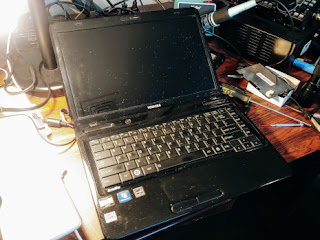
Toshiba L645D
The last laptop computer I acquired was this Toshiba L645D.  In 2010, it was already an economy model selling at a hair under $500.  With its "triple core" AMD processor, you got Windows 7.  Upgraded to dual boot Ubuntu Linux, it served for presentations and other uses for a good 10 years.

Not forever, though.  Recently I brought it out for some reason and found that its battery would not take a charge.  (I was on my second battery.)  OK, new batteries are available for about $25.  I got one, and verified that it would charge up normally, according to the LED indicators.  So I pushed the power button, but apart from a few LED flashes nothing more happened.  No display, no boot.

OK, there's another battery to check.  The "CMOS" battery is a 3-volt lithium cell, like the one that probably lives in your PC.  You have to unbutton your machine and dig for it.  I dug for mine, but it popped up and out and into the internals of the laptop.  Oops.  That means I have to disassemble the machine -- not a simple task.  Fortunately, there are good instructions at ifixit.com for just this system.

I got it apart and found the battery OK, and I was set to put in a new one.  But the battery holder was a flimsy plastic item that I had broken when I removed the old battery.   Yikes!  Amazon had a replacement that seemed compatible, so I ordered it and waited a couple of days.  (10 of them for ~$7.) Removing the old holder and putting in the new one required some semi-precision soldering, but it seemed to go alright.

Reintegrating the laptop parts (a 20+ step process) went not quite as smoothly as the disassembly, but well enough.  I only had one small screw left over.

Alas, the Toshiba did not come to life!  I am now reflecting on why I would put so much time into a system that at best would still be obsolete.

At least I do have a new battery pack and an 11 year old 320 GB SATA hard drive for the junk box.

Saturday, July 08, 2017

Things that can't be understood

My "fancy" homebrew computer (not pictured here) has been running nicely for about 8 years. It was big and powerful in 2009, using the new Intel Core i7-920 chip, with lots of RAM and lots of cooling.  Nowadays, Gimli (as I call it) runs mostly Windows 10, with a touch of Linux.

It runs up to 8 background threads simultaneously, running up some nice statistics with BOINC -- the science "@home" brokering site. Maybe we've discovered a pulsar or two, who knows?

This was alongside my "real" work which has been operating my ham radio station -- running SDR radios, logging, digital mode operation, etc.

That was until a few weeks ago, when Gimli started failing -- stopping suddenly with no blue screen of death or software logging, just a blank screen.  I thought maybe my checkered past as an overclocking experimenter was catching up with me.  I tried going back to the absolute minimal BIOS settings just in case.

I starting checking out what I might need to buy to upgrade this "ancient" machine through Newegg or Amazon -- and the discussions I'd need to have with the XYL.  Yes, there are many new options on the market.  The biggest one might be the advent of SSD technology (Solid State Disk).

As a last stand, I thought I'd check out the computer as best I could.  It's practically impossible to find a fault of the kind I was having.  You'd just have to replace key components one by one until it started working again.

Opening the box and blowing out the dust, I started wiggling the cables and re-seating the connectors. I pulled out the two RAM modules and "cleaned" the contacts (wiping with fingers), and I plugged them back swapping their positions.

Naturally when I put things all back together, Gimli came to life and hasn't crashed for a week or so now.  Maybe we're go for another 7 years?

Or maybe we're running on fumes.

Saturday, August 06, 2016

Windows 10 "Anniversary Update" & Ham Radio

There are 3 Windows 10 systems in the house.  I chose the least important one (a Toshiba laptop) to be the first sacrifice for the latest Microsoft update.  These updates are big deals.  This one took nearly 2 hours start to finish, and it had me go through the new installation checklist to decide what data gets shared with Redmond.  (I generally minimize that, hoping to keep a smidgen of privacy.)

The good news, apart from the long waiting for things to complete, is that my laptop is back to what it was before. Supposedly, there are benefits in the user interface -- more Cortana, etc., but they can be ignored fir the time being.

The truly worrying part of Windows evolution is that MS is asserting ownership of my data and my computing life in more and more ways.  In the name of "convergence", my PC is morphing into a cell phone, and I find myself slipping into the MS walled garden.  Why, it's enough to keep me on Linux for most of my work!

Unfortunately, I do need to keep Windows around for my Amateur Radio operations -- running the Flex 6500.  That is my "big" computer.  It will be the last one to be updated, given that the Flex software may need special TLC when there's a major Windows update.

Wednesday, January 14, 2015

FlexControl for Linux+ #hamr

Lately I've been on the air with a FLEX-6700 from FlexRadio Systems.  It's a great rig, but that's a story for another day.

Today's subject is the beautiful FlexControl, which is a "USB Knob" ($99.99).  It is designed as an adjunct input device for the Flex software defined radios, for users who need something more traditional than mouse-based pointing and clicking for tuning and managing a radio.

The product is provided for SmartSDR for Windows, the principal interface program for the Flex 6000 series.  It has a great feel, and it has 3 nice buttons and status lights. SmartSDR provides a Windows driver to work with the FlexControl.

So that's fine, but I'm mainly a Linux guy.  For unfortunate but understandable reasons, Flex only provides Windows control software.  What does the FlexControl look like when plugged into a Linux system?  I could not find any documentation.

With help from Wireshark and VirtualBox, we can do some reverse engineering.

The FlexControl is recognized by Linux (Ubuntu 14.04, but probably most other versions, too).  It appears as /dev/ttyACM0 on my machine. "ACM" signifies that this is a CDC_ACM device.  That category is loosely based on ancient Hayes modem interfaces, but don't worry about that!  Really, it just emulates an old-fashioned serial I/O connection at 115 Kbps.

You can set up minicom or any other Linux program to talk to this device.  The only remaining question is the protocol.  It turns out to be simple.  No surprise, this is a simple device.  The scoop:

Sending from FlexControl to host:
All commands terminate with ';' (no returns or line feeds)
U; - knob CW (single tick) -- U02; U03; U04; etc - multiticks
D; - knob CCW (single tick) -- D02; D03; D04; etc - multiticks
S; - short press, main knob
L; - long press, main knob
C; - fast double click, main knob


The fast knob codes reflect multiple encoder ticks between USB polling times, so the knob should be able to keep track of fast spinning.  (Alas, SmartSDR will not always keep up so well.)

XnS; - normal press, key n=1,2,3
XnL; - long press
XnC; - fast double click

e.g. 
   U; (frequency up one tick)
   X2S; (normal press, button 2)

Sending from host to FlexControl:


Ixyz;  where x,y,z = 1 or 0 for LED 0, 1, 2 on or off
e.g.
   I001; set right hand LED on
   I000; set all LEDs off

   I111; set all LEDs on

Note that SmartSDR for Windows only uses a fraction of the FlexControl's button capability.

See a simple Python program to illustrate how to communicate at http://aa6e.net/wiki/FlexControl

[Added 4/24/2023: That link has gone dead.  A copy of the old file can be found at http://web.archive.org/web/20150226074911/http://aa6e.net/wiki/FlexControl. Note that the code is written in version 2 Python.  It will need updating for version 3.]

The FlexControl should be very useful for all kinds of DIY software projects.  Connect it to your Raspberry Pi, your Arduino, your Linux PC for any kind of control project! (There are cheaper USB based controllers available -- for games, etc., but few have the right "ham" esthetics IMO.)

Maybe FlexRadio or one of the designers (K6TD or K6TU) would have divulged the same data if they were asked nicely, but it was more fun to work it out on my bench.

Wednesday, May 26, 2010

Ubuntu Hams!


Are you into software development, Ubuntu Linux, Amateur Radio? Then you need to know about Ubuntu Hams!

Wednesday, February 24, 2010

SDR Frustration!

I finally got around to building the SoftRock RXTX 6.2 kit that I've had sitting on the bench for nearly two years. This was stimulated by some progress on the audio front.

After a number of tries, my Edirol FA-66 audio subsystem is working with Ubuntu Karmic Koala. In the past, I've run into issues with the questionable support for Firewire devices in Linux. Finally, I figured out enough about how to use the Jack audio connection kit and the FFADO/FreeBob Firewire driver to make things work. (I wouldn't say I understand Linux audio, though!) The FA-66 offers up to 24 bit sampling at 192 kHz, which should cover a substantial part of most of the HF Amateur bands.

So I need a front-end like the simple SoftRock boards to act as both receiver and transmitter. The RXTX 6.2 was going be the one. I built the nice switched dual crystal oscillator board for 20 and 30 M operation, and then was ready to tackle the main board.

Alas, the main PC board is missing! Either it never came with the kit, or it got mislaid back in 2008.

Now what to do? DH1TW sent a note that suggests an answer. See next post!

Sunday, December 06, 2009

Yet another clock program

So I was grumping to myself that my nice, big, cheap Timex digital clock wasn't doing the best job for the ham station. I had modified it for 24 hour time, but the 10 hours digit could only provide a squiggle and not a proper "2" for 20-23 hours. That, and it is physically in the wrong place (away from my computer screen) and it doesn't show civil (local) time along with UTC. I've searched for a good hardware solution with no luck.

Then I looked at some of the many Linux clock options out there. None of those was exactly right for me. I wanted digits I could read across the room, but that would fit onto my crowded Linux desktop. Anyway, it's always more fun to use software you build yourself. I pulled out my Python and wxWidgets (wxPython) references and set to it. As with designing and building your own hardware, half the reward is the stuff you learn along the way.

So here is the product. If it looks like it might be useful to you, it should run on any recent Linux system with no hassles. I also checked it on Windows XP and Windows 7 for good measure. It works there, but you will have to download Python and wxPython from the web. (Linux systems like Ubuntu provide these as part of their repository system.) MacOS will likely also support this program.

This is free (as in beer) and open source software, distributed under the GNU General Public License. That means you can download it and modify it to your taste, as long as you are willing to make your improved source available to the community if and when you distribute your new version.

In a future version, it might be worth working on desktop space efficiency. You notice that nearly half the window area is wasted on Gnome's frame decorations and menus. That could be reduced by using "shaped" frames at the cost of complicating the code and creating non-standard window behavior.

Thursday, November 26, 2009

Why Linux/OSS for Amateur Radio?

How to explain to a non-computer-geek ham what Open Source Software and Linux are all about? OSS and Linux are important to software users the same way a good repair manual and schematics are important to hams. Not every ham knows what to do with schematics, but those who are inclined to open up, understand, repair, and modify their equipment certainly do. Without being able to see what's inside and what connects to what, there is very little you can do. That's exactly why you need to be able to access and work with source code when it comes to software.

These issues will directly affect relatively few hams. Many are "appliance operators" when it comes to software, just as for hardware. For them, a proprietary OS may be a good choice because of its familiarity and the huge choice of available software.

We can admire the dedicated hams who build their own stations and who are on the cutting edge of new hardware technologies. It's the same with software. With software becoming increasingly central to amateur radio (in SDR, digital modes, etc.), competence in coding is getting to be just as important as operating a soldering iron.

While you can roll your own software from scratch, it can be far more efficient (and -- as we like it -- cheaper!) to build your code in the OSS "ecosystem", making use of many libraries and tools that are free for the download. OSS really pays off when you give the fruits of your labor back to the community to spur further development.

These are a few of my open source thoughts!

(a comment on a Linux Journal blog)

Friday, August 21, 2009

Atomic Disintegration

My new, humble computer based on Intel's Atom CPU was a great little project at a low cost. It benchmarked at about half the performance of my older Athlon XP 2000+ on a per-thread basis, and it provided two hyperthread "processors" for Linux to use. All for about $64 for the board and CPU. (And it is 64-bit capable, but the value of a 64-bit OS is unclear in such a small system.)

Then, for larks, I set it up to run as a member of my World Community Grid effort. That had it running two threads for 24 hours a day. This was somewhat pointless, given that the new Intel Core i7 system is so much more powerful*, but it did manage to churn out some work-units for the Cause.

All was well for about 4 days. Then ping!, the Atom froze. I could reboot into BIOS sometimes, but couldn't load Linux or even memtest86+. An actual hardware failure -- I haven't seen many of these in recent years.

Over a period of days, I got more acquainted with my UPS driver, as I tried substituting various parts. Suspecting the hard drive or CD/DVD drive (old IDE technology). Tried a substitute 1 GB DDR2 RAM. No help.

So the fault was either in the Intel D945GCLF motherboard or the power supply. The motherboard has about 10 million times more transistors, so that seemed the likely culprit.

Using Amazon.com's amazingly efficient returns/exchange process, I had a new mobo in quick order, and all now seems well.

Do I dare run the WCG application any more?

As to ham radio, this system is my logging and digital modes computer for AA6E. We were dead in the water. I could have fallen back to my mic or key and used paper logging, but I wasn't quite that desperate!

--
* Both in absolute (45,232 MIPS vs 3,060 MIPS) and in power-specific terms (302 MIPS/W vs 64 MIPS/W).

Sunday, August 02, 2009

New Atom System

The latest computer system to come to life here at AA6E is based on the Intel Atom 230 processor. The Atom (out for a year now) uses the latest 45 nm fab technology for a chip that is optimized for low power consumption, but it supports either 32- or 64-bit operating systems and hyperthreading, giving the appearance of a dual-core system to the OS.

I bought the Intel D945GCLF board, which has the mini-ITX format -- it's really small compared to my other ATX and mini-ATX systems.

Intel D945GCLF Motherboard and Atom 230 Processor

The board mounts nicely in a spare Mini-ATX computer case, with all kinds of room to spare. I attached an older 20 GB hard drive and DVD to the legacy IDE port. Eventually, I may repackage the system into a smaller case, with more modern IO devices. But one of the nice features of the motherboard is its support for ancient interfaces -- Serial, Parallel, PS/2 Mouse, keyboard, and IDE, along with newer SATA, USB, etc.

The focus for me was low power consumption and low out-of-pocket cost. The CPU is supposed to require only 4 W and the basic board was $64 at Amazon, including CPU but no RAM. The major glitch building the system was that my numerous old PC power supplies did not supply the ATX12V connector (the 4 pin 12 V CPU power connector) or any SATA-style connectors. So, while I might have been able to wire up some connectors to use with an older supply, I sprang for a new unit. Selecting one was not as easy as it might have been. The power demand is minimal (under 100 W), but if you want "quality" (efficiency, power factor, noise filtering), those features are promoted for larger supplies. I ended up with a 500 W, $35 unit.

Performance

A thorough review of an Atom 230 system is available at Tom's Hardware. I did some testing that is more specific to my environment, comparing it with other systems here.

A favorite benchmark, which works with multi-threaded systems, is to "make" the hamlib system from source. (I am a Hamlib developer.) The make "-j" switch lets you specify how many parallel threads to divide the workload into. This is a useful test for some kinds of programming work, but it is hardly representative of all possible applications.

Pentium III 800 MHz
(This is the one that the new Atom system will replace.)
  • Idle power: 112 W (AC at wall plug)
  • Make (single thread) : 483 sec.

Athlon XP 2000+
  • Make (single): 239 sec

Core i7 920 (See prior article here and here.)
  • Idle power: 100 W
  • Full CPU load: 150 W
  • Make (-j 1): 41.8 sec
  • Make (-j 8): 17.3 sec
  • Make (-j inf.): 16.1 sec

Atom 230
  • Idle power: 40 W
  • Make (-j 1): 276 sec
  • Make (-j 2): 229 sec (showing improvement by hyperthreading)
  • Make (-j inf.): requires excessive virtual memory, never completes

Conclusion

The Atom-based system works very nicely for my application: running all my ham radio operations - digital modes (fldigi), logging (xlog), transceiver control, etc. The system has a responsive "feel" under Ubuntu that is equal to anything I was using before my Core i7 system came along. The low operating power and silent operation are pluses, and the small board size would be handy if I put it into a smaller case. Cheap is good, too.

Update:
BOINC benchmarks, Atom 230 (40 W)
612 floating point MIPS (Whetstone) per CPU
1530 integer MIPS (Dhrystone) per CPU

BOINC benchmarks, i7 920 (150 W)
2450 floating point MIPS (Whetstone) per CPU
5654 integer MIPS (Dhrystone) per CPU

Since the i7 920 has 8 "processors" (4 cores) and the Atom 230 has 2 "processors" (1 core), the i7 is much better in CPU MIPS per Watt.

Saturday, March 07, 2009

Kindle Hack Prescience

Yesterday's post foresaw the wonderful things that could happen if someone did some "special research" on the Kindle. Well, today's news (Ars Technica) tells of a hacker who has indeed gained access to the K2's Linux essence via the USB port. The original Kindle was hacked way back in 2007.

I don't expect to do this myself any time soon, but it is fun to watch another digital barrier fall.

Friday, March 06, 2009

Kindlemania


This is my 2 cent review of the latest gadget here, the Kindle 2 from Amazon. If you haven't heard about it, it's a hand-size tablet with a 7" ePaper screen, for very high quality black & white display of text (mainly). It is sold as an electronic book reader with a direct sales link to Amazon.

It's really a lot more than that. It is a free wireless web browsing terminal. The browser identifies itself as "Mozilla/4.0 (compatible; Linux 2.6.10) NetFront/3.4 Kindle/1.0 (screen 600x800)". The "3G" wireless link is actually free with no monthly or setup charges, after you buy the Kindle. The browser is labeled "experimental", and it has a lot of the feel of a cell-phone or PDA browser, but the screen resolution is quite acceptable for sites that are reasonably formatted for its size. I can log in and use my gmail account, but I wouldn't say the Kindle is going to replace my PC for general email.

It is a Linux box. You can see that from the Browser ID above, and you can also see it by reading the 70 (!) pages of legal information that are thoughtfully provided in Kindle's memory. There are interesting possibilities: I suppose it won't be long before we have hackers providing a Linux console session. You could use the Kindle as a (free!) wireless adapter via USB for your laptop. And so on. (Of course, Amazon may not smile on such activity.)

So we have a Linux box with ~2 GB of internal memory, a wireless link (Sprint, I think), USB, audio output, a nice screen, and a semi-useable keyboard. It will hold "1500 books", they say. You can convert and/or install your own pdf, doc, text files, etc., but not if they're too large. The only advertised conversion option for non-txt files, is to send email to Amazon where they pass it through the "cloud" (I suppose) and send the result over RF (for $0.10 a shot) or by email (free). But the file size is limited by the email process, ruling out many Google Books image-type PDFs, for example.

What the Kindle is not:
  • Email or IM machine. The keyboard is even worse (in some ways) than my Palm Treo's. There is no email client, but the platform would obviously support it.
  • Color, and the ePaper is too slow to support any animation or video.
  • Open. You have to use Amazon's applications programs, and there aren't many of them (yet). Our friendly hackers may overcome this in time, but expect Amazon to defend their platform even more than Apple and its iPhone, particularly because of the bundled RF link (which could be abused) and because of the "secure" commercial authentication that links you, your Kindle, and your Amazon account. (Where they hope you'll spend a lot of $$.)
  • Secure. There is no password or other protection on the Kindle, which means that anyone who gets the physical unit can cause mayhem in your Amazon account. This is a pretty serious shortcoming IMO.
  • Media Machine. The Kindle will play mp3's and show pictures, one at a time. The file browser function is rather weak (no folders), so you'd get lost pretty soon if you loaded up a lot of small files.
  • Telephone. It would not be a big technical step to incorporate a cell phone (VOIP) into the Kindle concept, but there is no audio input, and the network model might not support phone usage. Still, I don't know how many separate high-function digital devices I want to carry with me. The market will sort this out some day.
All in all an interesting device. I will use it for reading books, newspapers, and a few blogs, while waiting for the hacks to appear.

Tuesday, December 30, 2008

Debian Purity, iMacs & the usbserial problem

I'm moving my ham-oriented computing (digimodes, logging, etc.) to a 333 MHz purple Apple iMac. A beautiful older machine with plenty of zip for these uses. Since it is PowerPC based with only 384 MB RAM, my Linux choices are restricted. Happily (I thought), Debian would do the trick. One of Debian's virtues is that they provide Linux for many less common machine architectures.

All is well and good. I've got my USB-attached sound system working. (A story for another time.) I set up the build environment for Hamlib rig control and managed to compile the latest stuff from Sourceforge CVS. Fldigi and Xlog compile, too. So what remains?

I need to connect the iMac to my TenTec Orion's serial port. No problem, just move the 4-port Keyspan USB-serial box from my main x86 computer (running Ubuntu) to the Debian iMac. Surprise - the Keyspan's LEDs don't light. The Keyspan driver module doesn't load. Wait, the Keyspan driver module (part of Linux kernel) does not exist!

Cut to the chase: The Keyspan usbserial driver for my device has been deemed "impure" by the Debian group. This driver passes all the legal and policy hurdles for Fedora and Ubuntu, but Debian seems to have a "one drop" rule. Any hint of restriction on a software module means it's not going to be in a Debian release. Apparently, the Keyspan driver uses code that carries a phrase like "only for use on Keyspan products".

(It is possible to get the driver source and recompile the kernel to include it, but this would take time that I don't want to spend.)

My solution? Use a different USB-serial device. I happen to have one based on the FTDI chip and driver, which is supported on Debian (plug and play). This one-port gadget has no manufacturer's name on it, but I recall buying it at Staples, possibly under the Belkin name.

One problem with USB devices and Linux is that you can't easily tell if a particular device is supported, because the Linux drivers support particular chipsets, and the vendor's packaging rarely tells you what chipset is being used. At least one on-line vendor, USBgear, does tell you. I have no experience with them, but they do offer a number of 4 port units in the $70-90 range.

Debian's "purity" philosophy (similar to GNU's?) is very strict. They have a point, but flexibility is good, too. This idea of "freedom" is going to cost me $80 and several hours of head-scratching. For me, that will be the price of PPC support.

Sunday, November 16, 2008

HAUS Software

The OMS utility monitor project is now called HAUS (Home Automatic Utility System). Going for the big time, here!

The Python software is available now on my "static" site:

http://aa6e.net/software/HAUS/index.html

More information about operating experience and preliminary conclusions for the project will be coming.

Original blog post: http://blog.aa6e.net/2008/10/more-important-than-amateur-radio.html

Thursday, October 30, 2008

LOTW troubles


Steve K9ZW has a point.

LoTW bad news: Way too complicated to set up, especially compared with other "secure" services like e-banking. (And, I might add, poorly supported under Linux.)

LoTW good news: Works well once set up.

Saturday, October 18, 2008

Fedora - poof!

Faced with the decision to upgrade my Fedora 8 installation to Fedora 9 or the forthcoming Fedora 10, I made my decision.

I am off the Fedora treadmill now! We have become an Ubuntu 8.04 household. The "Long Term Support" feature of this release (until 2011!) was very appealing.

In the long term, this should mean less update & compatibility hassle. In the short term, there is an amazing amount of stuff that has to be ported over. Somehow, I can't live with the "vanilla" out-of-the-box configurations for very long...

Sunday, October 12, 2008

More important than Amateur Radio?

Yes, my oil usage, my carbon footprint, and ways to evade the financial meltdown. All these have taken me away from ham radio for the moment.

All these, plus one other. I won a little applications contest being held by a company called Plat'Home. They have a line of tiny Linux servers called the OpenMicroServer (OMS 400). These are headless, diskless Linux platforms, based on the RMI Alchemy au1550 chip -- a MIPS architecture device that runs at 400 MHz. A Compact Flash chip can be installed to serve as a hard drive. I use a 2 GB device. Plat'Home supplies a minimal Linux distribution called SSD/Linux, but you can also install Debian. (I haven't gone to Debian yet, but may do so.)

My application was a "Home Utility Support System" - a combination of hardware and software that would monitor operation of the home heating and hot water systems with an eye toward analyzing operations and reducing heating costs.

A prelimary report is available here as a PDF. The installation is shown in the photo at left. (Click on photos for high res.) Physical I/O is through Ethernet connected to a WiFi bridge that hooks into the household LAN, and through the USB to an inexpensive DLP-IO8-G 8-channel data acquisition and control module from DLP Design.

I built a number of interface devices that monitor the state (on/off) of the oil burner, the hot water circulator, and our three heating zone circulators. (Our hot water is supplied indirectly through a heat exchanger that receives hot water from the furnace "boiler".) The DLP interface also supports DS18B20 digital temperature sensors. I use two of these to monitor outside ambient temperature and hot water outlet (pipe) temperature.


The software is all developed in Python to log data every 30 seconds and to do analysis and data plots once a day. A sample run is shown here, as produced by gnuplot software running on the OMS400. The computer also runs the standard Apache web server to make data available to any authorized user anywhere on the Internet.

The work is still in progress, but I have a preliminary interesting, if depressing, result. The idle cycle of boiler (when no heat or hot water is demanded) is about one burst of several minutes every 3 hours. This just maintains the boiler's water temperature in its operating range. At a nominal 1.65 gallons per minute burn rate and with the current price of heating oil, that amounts to some $3.00 a day every day of the year!

Furnace people tell us never to let the system cool down, because of the thermal/mechanical cycling and because of possible corrosion problems, but paying ~$1,000 per year to idle is excessive. (I do dial down the operating temperature in the summer months, but we can't go too far or the domestic hot water will not come to full temperature.)

So there is some incentive to continue this project, potentially saving money (for ham work, of course), saving the environment, and having a little fun by the way.

Many thanks to Plat'Home for their support.

Wednesday, October 01, 2008

A "perfect" gadget

This is an Encore ENRXWI-G "Wireless LAN Extender". I needed to extend my home Ethernet into the basement, for a project I'll describe later. For about $30 (newegg.com), this box saves me an hour or two struggling in my crawlspace for CAT 5 installation. That's a fair trade, I'd say! I bought two of them, with one as a spare.

In addition, it turns out this is a Linux box. (If you're up to it, you can reverse engineer the system and flash it with your own OS. But I will let that exciting project go for now...) And it can actually be used as a full-blown WiFi access point and in a couple of other modes. The only limitation is its single 10/100 baseT Ethernet connection.

I did try the "Repeater" mode with the second unit. Maybe this would help me get a better signal to the basement ENRXWI-G? My main WiFi access point happens to throw a shadow into the basement area that I am using, probably because of an intervening brick chimney. Moving my AP a foot or two seems to cure the problem, but could the repeater function do the same? I set it up according to instructions, and it seemed to help on the basement-to-AP route, but if anything hurt the performance (lost packets, etc) AP-to-basement. (puzzling) In any case, no joy.

A WiFi repeater is probably more appropriate when your client and AP are truly separated by long distances, and the signal strength directly from client to AP is really weak. The AP-to-basement path here is relatively short. My transmission errors may be due more to multipath reflections than to weak signals.

The only downside of this box, shared with most WiFi devices, is that there is a lot of setup required. The supplied documentation is about average, but many people will scratch their heads at some point when setting things up.

In summary, score one for cheap Internet appliances.

Wednesday, July 16, 2008

Terabyte experiments

The Station recently acquired an Iomega "StorCenter Network Hard Drive", which is an NAS (Network Attached Storage) device that comes in a sleek Iomega-ish dark green case. Inside are two 500 GB hard drives that can run as a single 1 TB drive in JBOD mode (look it up!) or in RAID 0 mode (look it up too!). Because I intend to use it for backup, reliability is important, so I will probably run it as a 500 GB RAID 1 device, where the two drives mirror each other.

The Iomega device is reviewed here. Unfortunately, the review does not focus on the NFS protocol supported by the device. That is important for me, because we are running Linux primarily.

As it turns out, while the Iomega NAS runs Linux internally, it does not provide fully Linux-friendly NFS export. User and group IDs and protection modes do not behave as they should, as I would have it. However, it does provide an amazing amount of functionality for 2.8 cents/MB.

If the NFS personality proves too troublesome, we can always remove the drives and put them in a new Linux box and run NAS any way we want.

Technical stuff: The problem with NFS on this box is that there is basically no security at all. You don't need much in a captive NAS server, but you would like to preserve owner, group, and protection data, at minimum. However, little of the usual metadata is stored with the files. No UID/GID identification or time of last update. So 'rsync' won't work properly as a mirroring tool unless you specify --size-only, which means that your mirror may not be exact. (E.g., if an updated file has the same size as the previous one.)

If you want to use this box for 'exact' Linux disk backup, you need to use an old-fashioned method like dump or tar, treating this server as a glorified tape drive. (But remember, it's cheap and tiny!)

Wednesday, July 09, 2008

The Decline of Fedora

For those few who may be keeping track, here is the OS/distro count at this QTH.

Fedora Linux:1 desktop, 1 laptop (multiboot)
Ubuntu Linux:1 desktop, 1 server
Debian Linux:1 desktop (PPC Macintosh)
Windows XP:1 laptop (multiboot), 1 desktop (as VMware client)

Yesterday, the system manager (that would be me) lost patience with the wife's Fedora 8 system. It's audio stopped working after some system updates. I thought I'd cure that with a "clean" install of Fedora 9. No soap, but maybe it wasn't clean enough...

The last maneuver, before chucking it all and buying a Macintosh, was to install Ubuntu 8.04.1. That worked very nicely! Ubuntu's philosophy and handling of multimedia, not to mention its documentation, is very appealing after the frustrations of Fedora. Fedora is cutting edge, and often has put me into situations where I had to learn more than I wanted about Linux arcana and spend days making things work.

My "big" desktop Fedora system may be next to switch. Unfortunately, there is a lot of stuff to be re-customized in a new environment, beginning with VMware.